Most portal projects begin with a list of everything a customer has ever asked for. That list is the wrong starting point, because it mixes two completely different kinds of request, and a portal is only good at one of them.
Some questions have a correct answer that already exists somewhere in your systems. Where is my order. What did I pay last quarter. When is the engineer arriving. Others do not have an answer until a person decides what it should be.
The line is judgement, not importance
It is tempting to sort requests by how important they are, and to keep the important ones human. That produces a portal nobody trusts, because the things people most want to check — money, dates, status — are exactly the things you have held back.
Sort by whether the answer requires a decision instead. A delivery date that exists in your system is a fact, however important it feels. A request to move that delivery date is a judgement, however small it seems.
A status field that lags reality by a day is worse than no status field. People check it once, find it stale, and go back to phoning. Only publish what you are willing to keep current automatically.
What the portal should own
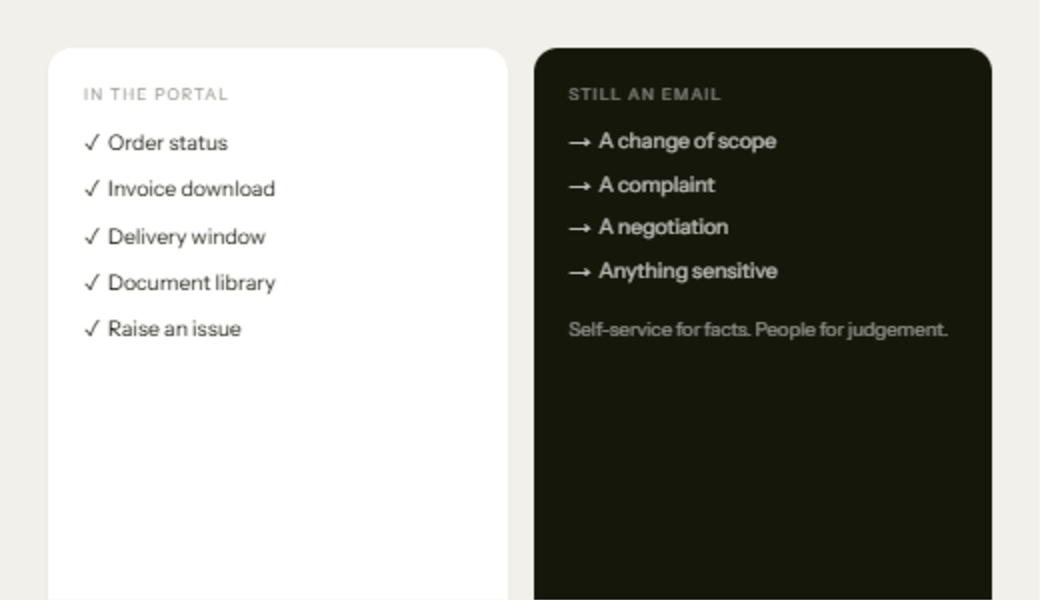
Order and job status, straight from the system of record. Invoices and statements, downloadable without asking. Delivery or appointment windows. A document library that holds the certificates, drawings and reports people currently request by email. And a way to raise an issue that creates a tracked ticket rather than an email in one person's inbox.
Every one of those is a fact you already hold. Publishing it removes an interruption without removing a relationship.
What should stay a conversation
A change of scope. A complaint. A negotiation over price or terms. Anything commercially or personally sensitive. Put a form in front of these and you will get a worse version of the message than the customer would have written in an email, stripped of tone, with no way to ask a follow-up question.
The portal's job with these is to route them well, not to answer them: capture the request, attach the context the customer would otherwise have to re-explain, and put it in front of a named person.
The test to apply
For each item on your list, ask whether you could answer it correctly, today, without asking anyone. If yes, it belongs in the portal and should be published automatically. If no, it belongs in a conversation, and the best thing software can do is make that conversation start with the full picture.