In most small and mid-sized companies, employee offboarding begins and ends with two clicks: reset the password and suspend the Microsoft 365 or Google Workspace mailbox. Everyone assumes that once the primary identity is locked, access to company data stops immediately.
Modern SaaS authentication does not work that way. Suspending an identity blocks future sign-in prompts, while already-issued session cookies, mobile mail tokens, and third-party OAuth grants — the 'Sign in with Google' or 'Connect Microsoft 365' approvals staff click every week — can remain valid until they are explicitly revoked. Add personal API keys, unmanaged AI browser extensions, and a shared office VPN password, and a departed contractor or compromised laptop can retain lateral access for weeks.
Where lingering access hides across a small-business stack
When we run access and offboarding audits ahead of cyber-insurance renewals or client security reviews, the gaps almost never sit inside the primary directory itself. They sit in the tokens, extensions, and network perimeters orbiting it:
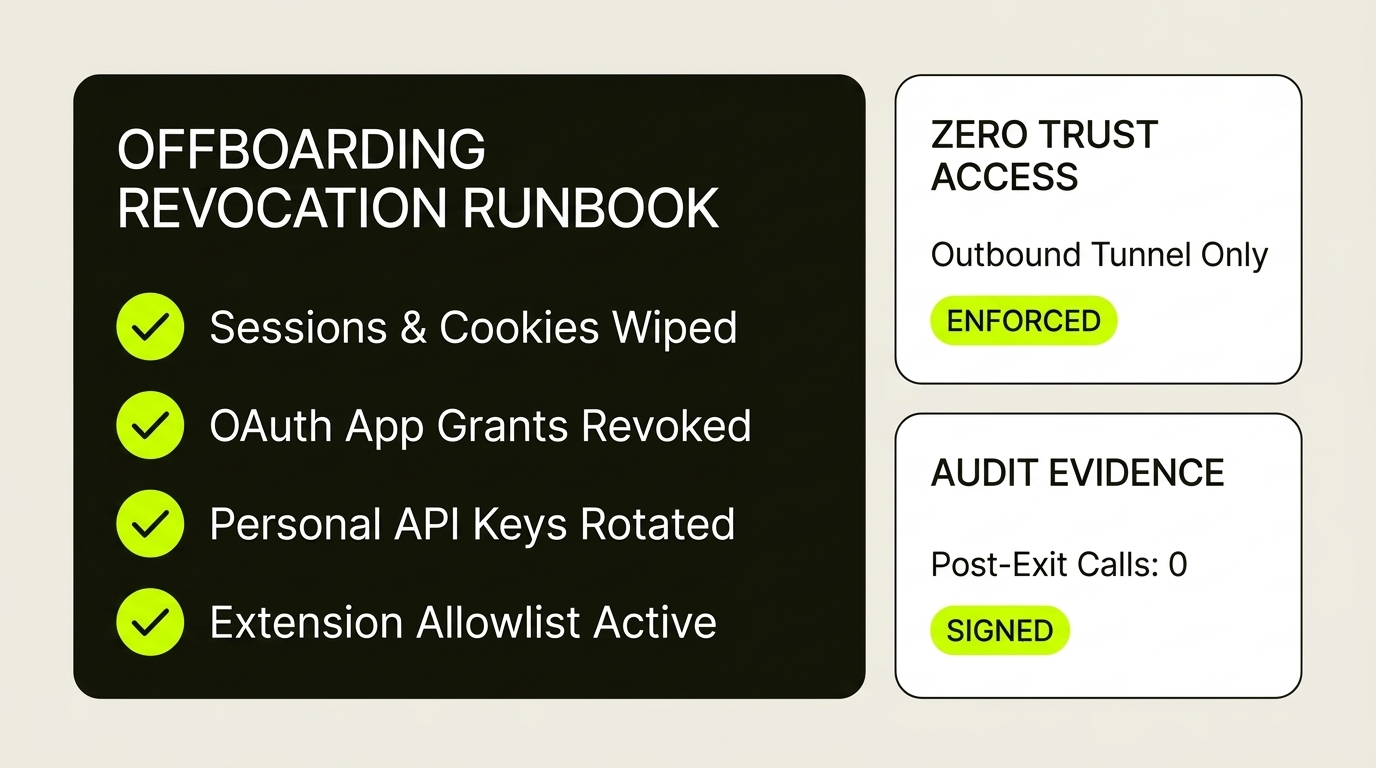
Disabling an Entra user stops fresh logins; you must still trigger Revoke sessions to kill active refresh tokens, remove Enterprise Application OAuth grants, and enforce Edge/Chrome extension allowlists via Intune.
Alongside suspending the account, clear sign-in cookies, sever third-party OAuth tokens under Connected applications, and block unlisted Chrome extensions per Organizational Unit.
Replaces shared office VPN credentials with outbound-only cloudflared tunnels gated by live Entra ID or Google Workspace checks — so revoking the user instantly cuts internal app reachability.
Personal access tokens, webhook secrets, automation API keys, and shared 1Password or Bitwarden vaults survive directory suspension unless inventoried and rotated on departure.
A six-step offboarding sequence that actually sticks
You do not need an expensive enterprise identity-governance suite to close these gaps. You need a repeatable sequence executed in order whenever someone leaves — and tested quarterly during access reviews:
Place a retention hold on the mailbox, transfer ownership of shared Google Drive or OneDrive folders and recurring calendar events to a manager, and reassign any automated workflows running under that user's personal identity so production jobs do not fail overnight.
Disable sign-in in Microsoft Entra ID or Google Workspace, then explicitly run session and refresh-token revocation and reset sign-in cookies. Remove registered MFA authenticators, passkeys, and legacy app passwords so cached clients cannot silently mint new access tokens.
Open the user's Connected applications (Google Admin) or Enterprise application consents (Entra ID) and revoke every third-party integration — from CRM sidebars and scheduling tools to personal note-takers and AI meeting bots that were granted read access to mail, calendars, or files.
Deprovision standalone SaaS accounts that sit outside single sign-on, revoke GitHub or cloud console personal access tokens created by the user, remove them from your company password manager, and rotate any shared supplier or admin credentials stored in vaults they could view.
Spoofed AI summary sidebars and productivity extensions are now a leading way session cookies and form data leak out of small teams. Use Microsoft Intune Settings Catalog or Google Admin Chrome management to block all unlisted extensions by default and allowlist only vetted extension IDs.
If remote access to an internal ERP or database still relies on a shared VPN profile, changing staff means reconfiguring everyone. Moving internal tools behind Cloudflare Zero Trust ties network access directly to your identity provider. Finish by verifying in the audit log that no API calls or token refreshes occurred after the offboarding timestamp.
Half of all rushed offboarding exceptions happen because nobody dares suspend the operations manager whose personal OAuth connection runs thirty Zapier or Power Automate flows. Always run company automations under a dedicated, documented service account.
Disabling a login locks the front door; revoking OAuth tokens, session cookies, and API keys collects the spare keys still sitting in third-party apps.
Common questions
Does disabling a user in Microsoft Entra ID or Google Workspace revoke third-party OAuth tokens?
Not automatically across every connected SaaS tool. Suspending the account blocks new logins, while previously issued OAuth refresh tokens and active browser session cookies can continue syncing data until an administrator explicitly revokes active sessions and removes third-party Connected application or Enterprise app consents.
How do small teams block malicious AI browser extensions in Google Workspace and Microsoft Intune?
In Microsoft Intune Settings Catalog or Google Admin Console (Devices → Chrome → Apps & extensions), set the default extension installation policy to block all unlisted extensions with a wildcard rule, then explicitly allowlist the 32-character Extension IDs of approved tools such as your company password manager and vetted business apps.
Why are small businesses replacing office VPNs with Cloudflare Zero Trust during security audits?
Traditional VPNs place remote laptops onto the entire office network and often rely on static gateways or shared profiles that lag behind staff turnover. Cloudflare Zero Trust uses outbound-only cloudflared tunnels with no open inbound firewall ports, checking Microsoft Entra ID or Google Workspace identity and device posture on every request — with a free tier that covers up to fifty users.