Until recently, connecting an AI assistant to internal company software required custom integration code for every data source. With Anthropic's Model Context Protocol (MCP) now supported across desktop assistants, code editors, and internal agent frameworks, an engineer or analyst can connect an assistant to PostgreSQL, HubSpot, GitHub, or Slack in ten minutes.
Speed is the appeal — and the trap. In most early setups, someone downloads a community MCP server onto their laptop, pastes a long-lived production API key or database connection string into a local JSON file, and starts asking questions. There is no central audit trail, no distinction between reading a record and deleting one, and implicit trust in every natural-language tool description the server exposes.
Three MCP risks traditional API security misses
Standard microservices accept rigid, developer-written calls. MCP servers expose natural-language tool descriptions and parameter schemas that a language model reads and acts upon dynamically. That creates three distinct failure modes:
First, tool poisoning: hidden prompt-injection directives embedded inside a third-party MCP tool's description or returned payload can steer the model into reading local secrets or calling a second tool with exfiltrated data. Second, token passthrough and over-scoped keys: handing an MCP server a broad admin token lets one tricked prompt mutate live customer billing or CRM records. Third, unmonitored local servers: processes running directly on employee laptops inherit full local file and network access with zero visibility for whoever answers client security questionnaires.
Gives assistants a uniform way to inspect schemas and invoke company tools — safe in production when paired with OAuth 2.1 audience-bound tokens rather than static shared keys.
Running servers behind an open-source gateway — such as Bifrost or Docker MCP Gateway — isolates processes, scans tool schemas, enforces per-role tool allowlists, and logs every call.
Hosts remote MCP endpoints behind identity-aware access policies, mutual TLS, and request rate limits so raw database credentials never sit in plaintext config files on laptops.
Connects analytical MCP tools to a read-only PostgreSQL role and PII-redacted SQL views, making accidental table drops or bulk sensitive exports structurally impossible.
Four guardrails before connecting agents to live data
Small teams can capture the productivity gains of MCP without building a sprawling governance bureaucracy by enforcing four architectural rules from day one:
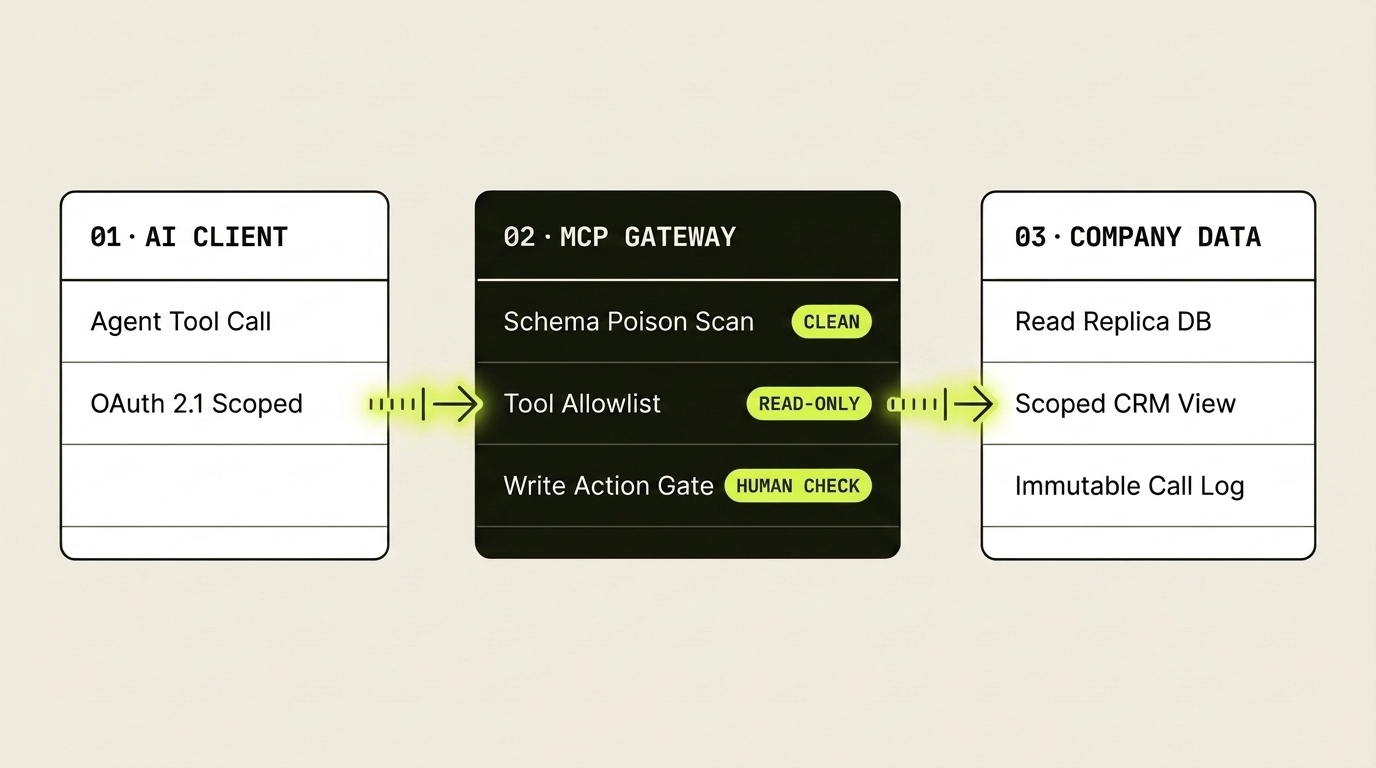
Instead of letting twenty laptops run unvetted local servers against production APIs, route agent traffic through a central MCP gateway (such as open-source Bifrost or Docker MCP Gateway). Centralizing the entry point gives you one place to pin approved server versions, inspect tool descriptions for schema poisoning, and record an immutable audit log of every tool call and argument.
Follow the MCP authorization specification strictly: authenticate users with OAuth 2.1 + PKCE, bind tokens to the specific MCP server resource (RFC 8707), and forbid token passthrough where a server forwards raw client tokens upstream. An assistant should only ever hold the narrowest permission the signed-in human already has.
Split lookup tools from action tools at the credential level. Bind reporting and search tools to read-only database replicas or read-scoped CRM tokens. Any tool capable of refunding an invoice, deleting a record, or messaging an external customer should draft the payload and pause for explicit human confirmation.
If you use community or vendor-supplied MCP servers, run them inside locked-down containers with no host filesystem mounts and outbound network rules restricted solely to the single API domain they are meant to reach. Even if a dependency or prompt is compromised, it has nowhere to send data.
Because language models treat MCP tool descriptions as instructions, upgrading an unpinned third-party MCP server can silently change how your agent behaves. Pin digests in source control and review schema diffs the same way you review code dependencies.
Give AI agents read-only eyes on scoped views, an audited gateway in the middle, and a human hand on every button that changes state.
Common questions
What is tool poisoning in Model Context Protocol (MCP), and how do you prevent it?
Tool poisoning occurs when malicious instructions are hidden inside an MCP tool's natural-language description, parameter schema, or returned output, tricking the language model into exfiltrating sensitive context or invoking other tools dangerously. You prevent it by pinning vetted MCP server versions, scanning tool manifests through an MCP gateway, isolating servers in containers with strict egress rules, and requiring human approval for external writes.
Why should teams place an MCP gateway in front of internal databases and SaaS APIs?
An MCP gateway — such as open-source Bifrost or Docker MCP Gateway — replaces scattered plaintext API keys on employee laptops with centralized authentication, per-role tool allowlists at the JSON-RPC tool-call layer, rate limits, and a complete audit trail of every query an AI assistant runs.
How does OAuth 2.1 stop token passthrough risks in remote MCP servers?
OAuth 2.1 with PKCE and RFC 8707 resource indicators binds each access token explicitly to the intended MCP server audience rather than letting a server accept and blindly forward broad upstream SaaS or cloud tokens. That ensures a compromised or misconfigured MCP endpoint cannot reuse a user's token against unrelated internal APIs.