Almost every established wholesale distributor, clinic, transport firm, and manufacturer runs on software installed a decade ago. It might be an on-premise Sage installation, an older Microsoft Dynamics NAV setup, an AS400 terminal, or an Access database custom-built in 2008.
The software works. It calculates margins accurately and holds years of customer ledger history. But it has no REST API, no webhooks, and the vendor wants two hundred thousand pounds for a cloud migration. So every morning, three people sit at their desks re-typing customer orders from emails into a desktop application by hand.
Why naive screen scraping is a trap
When non-engineers attempt to automate desktop software, they default to coordinate-based macros: move the mouse to pixel (320, 480), double-click, paste text, press Tab, and click save. This works until a Windows update changes border padding, someone changes the monitor resolution, or a pop-up appears behind the main window.
Professional systems engineering avoids fragile mouse clicks completely. We evaluate legacy desktop integrations across four distinct architectural layers, choosing the most stable method the system allows.
The four integration layers (from cleanest to last resort)
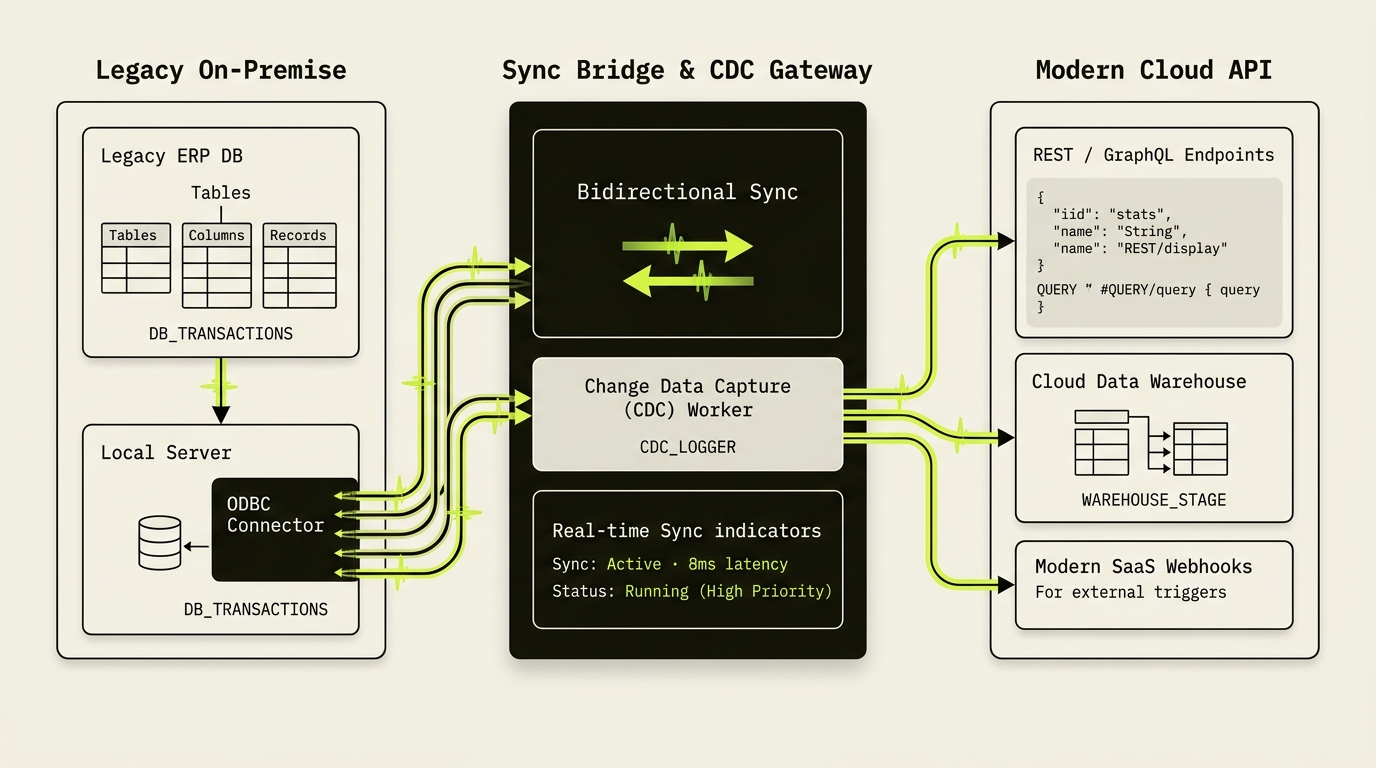
Most legacy Windows programs store data in an underlying SQL Server, PostgreSQL, or ODBC-compatible database. Rather than touching the application interface, we set up a secure, read-only replication pipeline. Modern cloud portals and dashboards query the replicated database in milliseconds, without putting any load on the legacy desktop software.
Almost every legacy ERP has a built-in batch import utility for CSV or XML files. Instead of typing orders, we build a cloud automation that formats web orders into the exact CSV schema the ERP expects and drops the file onto an encrypted local network share. A local script triggers the ERP's native import routine every ten minutes.
When direct database writes violate software warranties and file imports do not exist, we use desktop Robotic Process Automation (RPA) like Power Automate Desktop or UiPath. Unlike screen scrapers, these tools attach to the Windows accessibility tree — identifying fields by their programmatic control IDs and internal control names rather than screen coordinates.
For green-screen AS400 or UNIX terminal backends, we bypass the visual emulator window entirely. We write lightweight headless terminal scripts that open encrypted SSH/Telnet sessions, send keyboard sequences, parse the raw screen buffer directly, and log every command.
Read directly from the database whenever you need reporting. But never execute raw SQL INSERT statements into a proprietary accounting table without vendor sign-off. You will bypass internal balance validations and corrupt your ledger.
Retaining audit trails and accountability
When human employees type an order into an ERP, their login name is attached to the record. If an automated process begins creating transactions, you must not use a generic administrator login with unconstrained privileges.
Create a dedicated service account — for example, 'svc-bot-orders' — with the minimum permissions required. Ensure every automated transaction carries an external reference number (like a Stripe charge ID or website order number) in a memo field so any auditor can trace the record back to its digital origin.
You do not need to spend half a million pounds replacing the system your business runs on just to stop your team from re-typing orders into a computer.
The pragmatic way forward
Modernizing a business does not require a high-risk multi-year core replacement project. By wrapping legacy software with modern integration bridges, you give your customers self-service portals and your team automated workflows today — while keeping the dependable engine running undisturbed underneath.
Common questions
How can you automate legacy desktop software that has no REST API?
Start with the cleanest non-UI layer available: read-only SQL/ODBC database replication for live dashboards and portals, automated CSV/XML hot-folder imports for creating records safely, UI-anchored desktop RPA attached to Windows accessibility control IDs when imports do not exist, and headless SSH/Telnet scripting for green-screen terminals.
Is it safe to write directly into a legacy ERP's SQL database?
Reading via a replica is safe and fast, but raw SQL INSERT or UPDATE statements into proprietary accounting tables should be avoided without explicit vendor approval — bypassing the application's validation layer risks corrupting ledger balances or voiding support.